Writes to past customers
Simpro says Delight reads each customer's work history, equipment and service records, and writes to them about their own jobs.

Delight is Simpro's new AI for following up past customers. Simpro showed it on a webinar on 19 November 2026. Here is what Simpro says it does, where it may suit you, and how EasyDone Work compares.
Simpro says Delight reads each customer's work history, equipment and service records, and writes to them about their own jobs.
Its Service Opportunity Finder flags ageing equipment, overdue compliance checks and services a customer may not know you offer.
Simpro says it follows up quotes that went quiet, checks in after a job, and reaches customers before the busy season.
Delight runs on Simpro, and the job-to-proof half of the webinar was EngineRoom, a separate company. In EasyDone Work the follow-up sits in the same app as the quote, the job and the invoice.
Simpro didn't give a price for Delight on the webinar, only 30% off until 26 November. Ours is printed: $195 a month inc GST for 1 to 3 users, then $65 for each extra user.
Delight is about follow-up. EasyDone's Assistant works across Work itself, by voice or text, and the AI front desk answers your business number.
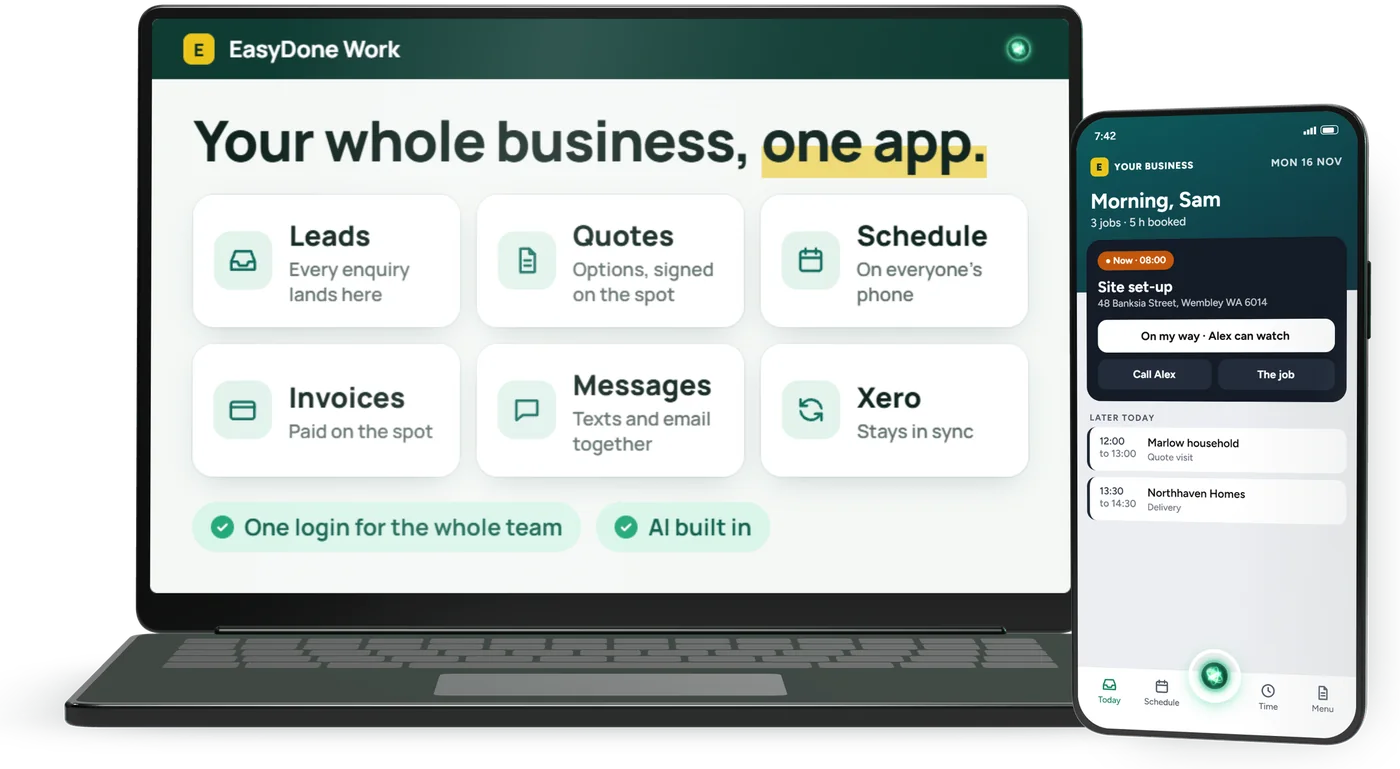
Simpro says Delight is "natively connected to Simpro": it reads your customers, jobs and equipment, writes to past customers and shows who came back and what it was worth. On the webinar it was shown on slides, not as a live demo.1
Simpro didn't say how Delight sends its messages, by email or text, or whether you approve each one before it goes.
EasyDone: In EasyDone Work the enquiry, the quote, the job, the invoice and the follow-up live in one app. Ready-made automations follow up quotes that go quiet, ask for a review once the job is paid and chase unpaid deposits, and each one shows its runs and what came back.
The marked rows compare Simpro itself, from Simpro's own website, read 15 November 2026. The Delight rows at the bottom come from Simpro's webinar of 19 November 2026. Ours come from this website. Tap any row for the detail and the source.
EasyDone Work
27/ 27
a straight yes on every row
Simpro
5/ 27
a straight yes
27 features, each read from Simpro's own website on 15 November 2026. Tap any row for the source.
| Feature | EasyDone Work27 / 27 yes | Simpro5 / 27 yes |
|---|---|---|
| Where EasyDone is ahead of Simpro (22 rows) | ||
| Your own AI front desk (Yes) | Pulse AI receptionist, a paid add-on (Add-on or partner) | |
Calls answered, booked and written up EasyDone Work Your own AI front desk (Yes) With the Voice module, an AI front desk with an Aussie voice answers your business number and your texts. She books and moves visits, takes messages and puts callers through to you, texts back missed and after-hours calls, and every call is written up with the next step. You tell her what she can do in Settings. Voice is from $100 a month inc GST. Someone with the right permissions can listen in on her call and take it over, and is shown what's been said. From easydone.work, this website Simpro Pulse AI receptionist, a paid add-on (Add-on or partner) Pulse answers calls 24/7, writes the job into Simpro and holds a booking for your team to confirm, on monthly plans by call minutes. Texting the caller after the call is not described on its page. Source: Simpro: Pulse AI receptionist, read 15 November 2026 | ||
| Included in every plan (Yes) | Texts and calls through paid add-ons (Add-on or partner) | |
No separate chat app EasyDone Work Included in every plan (Yes) Private messages to your team with photos, videos, and the job or booking right in the thread. Call each other in the app, with the job at a glance on the call. Staff chat and staff calls are included in every plan. From easydone.work, this website Simpro Texts and calls through paid add-ons (Add-on or partner) The SMS add-on texts field staff from Simpro, and the VoIP add-on (with your own VoIP provider) can call employees from a softphone. A built-in staff chat space is not described on the pages read. Source: Simpro: pricing, base plan and add-ons, read 15 November 2026 | ||
| Every caller hears back (Yes) | SMS and VoIP are paid add-ons (Add-on or partner) | |
Nobody left wondering EasyDone Work Every caller hears back (Yes) Every caller gets a thank-you text after the call. Missed and after-hours calls get a text back, and the front desk rings a customer back when you ask her to. With the Voice module. From easydone.work, this website Simpro SMS and VoIP are paid add-ons (Add-on or partner) With the VoIP add-on and your own VoIP provider you make and take calls inside Simpro, and the SMS add-on sends and tracks texts; the number customers see depends on your provider. Lightning's Two-Way Messaging keeps customer conversations in one place, with status updates, appointment confirmations and on-the-way alerts. Source: Simpro Help Guide: How to Use VoIP Integration, read 15 November 2026 | ||
| Campaigns, in paid invoices (Yes) | Marketing ROI through partner integrations (Add-on or partner) | |
Marketing measured in paid invoices EasyDone Work Campaigns, in paid invoices (Yes) Campaigns shows what each flyer, ad, sign and event made, in paid invoices. It's on for every business, and each enquiry carries where it came from. From easydone.work, this website Simpro Marketing ROI through partner integrations (Add-on or partner) Simpro points to HubSpot, connected by third-party partners, for marketing ROI insights, and Delight shows what its own repeat-customer outreach brought back. Tracking which flyer, ad, sign or event won a job is not described on the pages read. Source: Simpro: HubSpot integration, read 15 November 2026 | ||
| Built for you with Alterations (Yes) | Extra-cost configuration (Partly) | |
When settings are not enough EasyDone Work Built for you with Alterations (Yes) With the Alterations module, you file the request in the app and we agree the scope and timing with you. It's built on a practice copy, never your live data, and you try it and approve it before it lands. Alterations is $300 a month inc GST. From easydone.work, this website Simpro Extra-cost configuration (Partly) The published service is paid configuration, forms and reports. A promise to change the core app for your business is not established. Source: Simpro: Professional Services, read 15 November 2026 | ||
| Drag, connect, automate (Yes) | Rule-based Data Feed instead (Partly) | |
See what happens next EasyDone Work Drag, connect, automate (Yes) Drag the steps into order and connect the follow-through. Send messages, update records and put an AI assistant to work in the same workflow. From easydone.work, this website Simpro Rule-based Data Feed instead (Partly) Data Feed runs rule-based automations from emails and attachments, and the base plan includes three feeds, with paid setup help available. A canvas where you drag steps into order is not described on the pages read. Source: Simpro: pricing, base plan and add-ons, read 15 November 2026 | ||
| Inside Work, no second sign-in (Yes) | Lightning: shared, separate sign-in (Partly) | |
Useful actions, with permission EasyDone Work Inside Work, no second sign-in (Yes) Ask for a quote, a record update or a customer email, by voice or text, and your Assistant does the work you approve, inside Work itself: no separate app or second sign-in. AI is included: 500 AI credits for each user each month, and past it the AI keeps working while we talk to you. From easydone.work, this website Simpro Lightning: shared, separate sign-in (Partly) Simpro's AI (JustAsk, JustDo and the agents) is Lightning, the AI layer Simpro Group added across Simpro, AroFlo and BigChange, sold as a platform upgrade on your contract. The same layer opened a separate sign-in in a live AroFlo account we checked on 9 November 2026. In our view it doesn't look or feel built in. Source: Simpro Group launches Lightning (13 May 2026), read 15 November 2026 | ||
| Talk to it. It talks back. (Yes) | Voice input; spoken replies not listed (Partly) | |
Answers out loud, eyes on the road EasyDone Work Talk to it. It talks back. (Yes) Type or talk, on your phone or at your desk. Ask your Assistant out loud and it answers out loud, so your eyes stay on the road. It asks before anything a customer sees or that moves money; everything else has an Undo. From easydone.work, this website Simpro Voice input; spoken replies not listed (Partly) You can say what needs doing to JustDo, and JobScribe transcribes job notes while technicians work. Spoken answers back from an assistant are not listed on the pages read. Source: Simpro: JustDo AI office assistant, read 15 November 2026 | ||
| AI sorts out the columns (Yes) | Import / feed setup (Partly) | |
Less spreadsheet preparation EasyDone Work AI sorts out the columns (Yes) Let AI work out the supplier’s columns and prepare the prices. Check the matches, fix anything flagged, then bring the list into your catalogue. From easydone.work, this website Simpro Import / feed setup (Partly) The published routes are data imports and Data Feed automations, which can update catalogues. AI reading of any supplier's price file is not described on the pages read. Source: Simpro: Professional Services, read 15 November 2026 | ||
| Tracking updates itself (Yes) | Separate Data Feed setup (Partly) | |
Stop copying delivery details by hand EasyDone Work Tracking updates itself (Yes) The supplier emails an update. EasyDone matches it to the order and fills in the tracking number, carrier and delivery date. Anything unmatched stays ready for review. From easydone.work, this website Simpro Separate Data Feed setup (Partly) Requires a configured Data Feed route. The exact tracking fields, matching rules and setup cost need confirmation. Source: Simpro: Data Feed, read 15 November 2026 | ||
| Paperwork files itself (Yes) | Separate Data Feed setup (Partly) | |
The right PDF, with the right order EasyDone Work Paperwork files itself (Yes) Supplier paperwork finds its way to the right purchase order. Matching PDFs are filed automatically, with a record of what was added and duplicate checks built in. From easydone.work, this website Simpro Separate Data Feed setup (Partly) Requires Data Feed configuration. Original-file retention and purchase-order matching need checking for your setup. Source: Simpro: Data Feed, read 15 November 2026 | ||
| Rich, visual proposals (Yes) | Custom forms needed (Partly) | |
More than a list of prices EasyDone Work Rich, visual proposals (Yes) Turn your quote into a rich customer proposal. Bring together the scope, photographs, options and proof of your work, then preview exactly what the customer will see. From easydone.work, this website Simpro Custom forms needed (Partly) Custom proposal/tender documents go through forms and professional services. An equivalent native proposal editor is not established. Source: Simpro: Professional Services, read 15 November 2026 | ||
| Find it. Save it. Use it. (Yes) | Not on their website | |
Less searching, copying and pasting EasyDone Work Find it. Save it. Use it. (Yes) Find product pictures and key specifications online. Review the match, save it to the item and use it in your proposal. From easydone.work, this website Simpro Not on their website Supplier catalogue imports do not establish the same web lookup and specification extraction. Not on Simpro's website when we read it, 15 November 2026 | ||
| Add proof of your work (Yes) | Not on their website | |
Bring proof of your work into the sale EasyDone Work Add proof of your work (Yes) Make your best work help win the next job. Keep case studies, photographs and useful media together, ready to add to a customer proposal. From easydone.work, this website Simpro Not on their website A dedicated, reusable case-study library connected to proposals is not listed. General job photos or attachments do not establish that workflow. Not on Simpro's website when we read it, 15 November 2026 | ||
| Live prices customers can open (Yes) | Customer rates; live list not listed (Partly) | |
A catalogue they can open EasyDone Work Live prices customers can open (Yes) Give each customer a live price list they can open. Build it from your products and agreed prices, with a share link you control. From easydone.work, this website Simpro Customer rates; live list not listed (Partly) Customer rates and a portal do not establish a shareable live product catalogue. Source: Simpro Help Guide: customers, rates and contracts, read 15 November 2026 | ||
| A proper home for support (Yes) | Service-job approach (Partly) | |
Requests, equipment and resolution EasyDone Work A proper home for support (Yes) Give support requests their own home. Assign the ticket, see the customer’s equipment and agreement, and keep a clear record of the fix. From easydone.work, this website Simpro Service-job approach (Partly) The documented approach manages service work as jobs. A separate customer help-desk ticket workspace matching this row is not established. Source: Simpro: pricing, base plan and add-ons, read 15 November 2026 | ||
| Your know-how, searchable (Yes) | Not on their website | |
Your own business knowledge base EasyDone Work Your know-how, searchable (Yes) Write an answer once so the team can find it again. Keep your business knowledge searchable, with your assistant able to use the information it has permission to read. From easydone.work, this website Simpro Not on their website The published training agents do not establish the same staff-authored knowledge library. Not on Simpro's website when we read it, 15 November 2026 | ||
| Servicing, history & handovers (Yes) | Simtrac 360 fleet add-on (Add-on or partner) | |
Records beyond the next appointment EasyDone Work Servicing, history & handovers (Yes) Keep each vehicle’s details, service history and handovers in one place. See what is due and what has already been done. From easydone.work, this website Simpro Simtrac 360 fleet add-on (Add-on or partner) Simtrac 360 is a paid add-on with an in-vehicle device; it tracks vehicles and runs maintenance plans by date, odometer or engine hours. Check the price for your fleet. Source: Simpro: Simtrac 360 fleet management, read 15 November 2026 | ||
| Make the app feel like yours (Yes) | Not on their website | |
A workspace that fits your team EasyDone Work Make the app feel like yours (Yes) Hide the modules you do not need and choose which pages your team can access. Make the workspace fit your business. From easydone.work, this website Simpro Not on their website Security settings and paid configuration do not establish the same menu controls. Not on Simpro's website when we read it, 15 November 2026 | ||
| Your mailbox. Your signature. (Yes) | Not on their website | |
Your Microsoft mailbox. Your rich signature. EasyDone Work Your mailbox. Your signature. (Yes) Send from your connected Microsoft mailbox with your logo and personal HTML signature. Write alongside the quote or customer record; customers receive a familiar business email. From easydone.work, this website Simpro Not on their website The exact rich per-person signature plus signed-in Microsoft-mailbox route is not listed. Not on Simpro's website when we read it, 15 November 2026 | ||
| Across the app (Yes) | AI drafts notes, summaries and quotes (Partly) | |
Emails, notes and quote wording EasyDone Work Across the app (Yes) Get help with the words while you work: customer emails, proposals, notes and more. Review the finished wording and keep your own tone. From easydone.work, this website Simpro AI drafts notes, summaries and quotes (Partly) JobScribe and JobBrief write job notes and customer summaries, and JustDo drafts quotes from a customer's own words. An inline rewrite control inside emails and quotes is not described on the pages read. Source: Simpro: JustDo AI office assistant, read 15 November 2026 | ||
| Built in (Yes) | Separate Podium service (Add-on or partner) | |
Follow up after good work EasyDone Work Built in (Yes) Google review requests are built in, so a finished job can turn into a review. From easydone.work, this website Simpro Separate Podium service (Add-on or partner) Requires the separate Podium reviews offering and its commercial terms. Source: Simpro: pricing, base plan and add-ons, read 15 November 2026 | ||
| Where Simpro has it too (5 rows) | ||
| Pictures in products & quotes (Yes) | Product images on quotes (Yes) | |
Help customers see what they are buying EasyDone Work Pictures in products & quotes (Yes) Show customers what they are buying. Keep pictures with your products and bring them into your quotes and proposals. From easydone.work, this website Simpro Product images on quotes (Yes) Quotes can carry product images, and pre-builds can hold images, brochures and technical information. Check how pictures lay out on the quote form you send. Source: Simpro: Win more jobs (quoting), read 15 November 2026 | ||
| Quote on your phone, signed on site (Yes) | Quote, show pictures, sign on site (Yes) | |
On your phone, with product pictures EasyDone Work Quote on your phone, signed on site (Yes) Build the quote on your phone, with a picture on each line. Hand the phone over and the customer accepts and signs before you leave. From easydone.work, this website Simpro Quote, show pictures, sign on site (Yes) Simpro shows quotes to customers on your device, with photos and upgrade and membership options, and takes the customer's signature on the spot. Source: Simpro: Win more jobs (quoting), read 15 November 2026 | ||
| Build the agreement. Track the work. (Yes) | Included (Yes) | |
Keep the terms with the work EasyDone Work Build the agreement. Track the work. (Yes) Build the customer’s service agreement and keep the work attached to it. Rates, equipment and service history stay connected. From easydone.work, this website Simpro Included (Yes) Customer contracts are documented. Check the form-building and billing scope for your agreement; no absence is claimed. Source: Simpro Help Guide: customers, rates and contracts, read 15 November 2026 | ||
| See stock. Reserve it. Track it. (Yes) | Included (Yes) | |
Stock on hand, reserved and ready EasyDone Work See stock. Reserve it. Track it. (Yes) See stock on hand, reserve it for the work and record goods received. Inventory, orders and purchasing stay connected. From easydone.work, this website Simpro Included (Yes) Inventory is included in the documented offering. No absence is claimed. Source: Simpro: pricing, base plan and add-ons, read 15 November 2026 | ||
| Invoices out. Payments back. (Yes) | Transfer-based connection (Yes) | |
Xero, with the transfer scope clear EasyDone Work Invoices out. Payments back. (Yes) Send reviewed invoices to Xero or QuickBooks Online and bring payment records back. Keep the transfer history visible so you can check what moved and what needs attention. From easydone.work, this website Simpro Transfer-based connection (Yes) The documented workflow uses transfer actions. Do not assume every record is continuously synchronised. Source: Simpro: Xero integration, read 15 November 2026 | ||
| The basics (6 rows) | ||
| Follow-up is part of EasyDone Work itself: the same app as your enquiries, quotes, jobs and invoices. | Simpro says Delight is an AI "digital worker" for follow-up, "natively connected to Simpro". | |
EasyDone Work Follow-up is part of EasyDone Work itself: the same app as your enquiries, quotes, jobs and invoices. From easydone.work, this website Simpro Simpro says Delight is an AI "digital worker" for follow-up, "natively connected to Simpro". Source: Simpro Delight: "Your Next Job Is Hiding in Your Last One: Automated Growth with Delight by Simpro & EngineRoom", read 19 November 2026 | ||
| A ready-made automation follows up quotes that go quiet. Switch it on, or describe your own and build it step by step. | Simpro says Delight chases quotes that went quiet and checks in after the job. | |
EasyDone Work A ready-made automation follows up quotes that go quiet. Switch it on, or describe your own and build it step by step. From easydone.work, this website Simpro Simpro says Delight chases quotes that went quiet and checks in after the job. Source: Simpro Delight: "Your Next Job Is Hiding in Your Last One: Automated Growth with Delight by Simpro & EngineRoom", read 19 November 2026 | ||
| Service agreements with visits planned through the year, and an "every past customer" list that shows why each one is on it, ready to email or text. | Simpro says its Service Opportunity Finder flags ageing equipment, overdue compliance and services a customer may not know you offer. | |
EasyDone Work Service agreements with visits planned through the year, and an "every past customer" list that shows why each one is on it, ready to email or text. From easydone.work, this website Simpro Simpro says its Service Opportunity Finder flags ageing equipment, overdue compliance and services a customer may not know you offer. Source: Simpro Delight: "Your Next Job Is Hiding in Your Last One: Automated Growth with Delight by Simpro & EngineRoom", read 19 November 2026 | ||
| Automation results for the last 30 days: runs, messages sent, clicks and money recovered, plus which flyer, ad or sign won the work. | A dashboard of who came back, when, for what and what it was worth. Simpro shared customer results; we haven't checked them. | |
EasyDone Work Automation results for the last 30 days: runs, messages sent, clicks and money recovered, plus which flyer, ad or sign won the work. From easydone.work, this website Simpro A dashboard of who came back, when, for what and what it was worth. Simpro shared customer results; we haven't checked them. Source: Simpro Delight: "Your Next Job Is Hiding in Your Last One: Automated Growth with Delight by Simpro & EngineRoom", read 19 November 2026 | ||
| Runs can be held for your review, customers who opted out are skipped, and the Assistant can check with you before it sends. | Not said on the webinar. | |
EasyDone Work Runs can be held for your review, customers who opted out are skipped, and the Assistant can check with you before it sends. From easydone.work, this website Simpro Not said on the webinar. Source: Simpro Delight: "Your Next Job Is Hiding in Your Last One: Automated Growth with Delight by Simpro & EngineRoom", read 19 November 2026 | ||
| $195 a month for 1 to 3 users, then $65 for each extra user, all inc GST. See pricing | Not given on the webinar. 30% off Delight until 26 November 2026. | |
EasyDone Work $195 a month for 1 to 3 users, then $65 for each extra user, all inc GST. See pricing From easydone.work, this website Simpro Not given on the webinar. 30% off Delight until 26 November 2026. Source: Simpro Delight: "Your Next Job Is Hiding in Your Last One: Automated Growth with Delight by Simpro & EngineRoom", read 19 November 2026 | ||
The Delight details are what Simpro said on its webinar of 19 November 2026: Simpro's claims, which we haven't tested, and they may change. The marked rows in the table come from Simpro's own website, read 15 November 2026. We describe our own product from this website. Nothing here is a hands-on test of Delight.
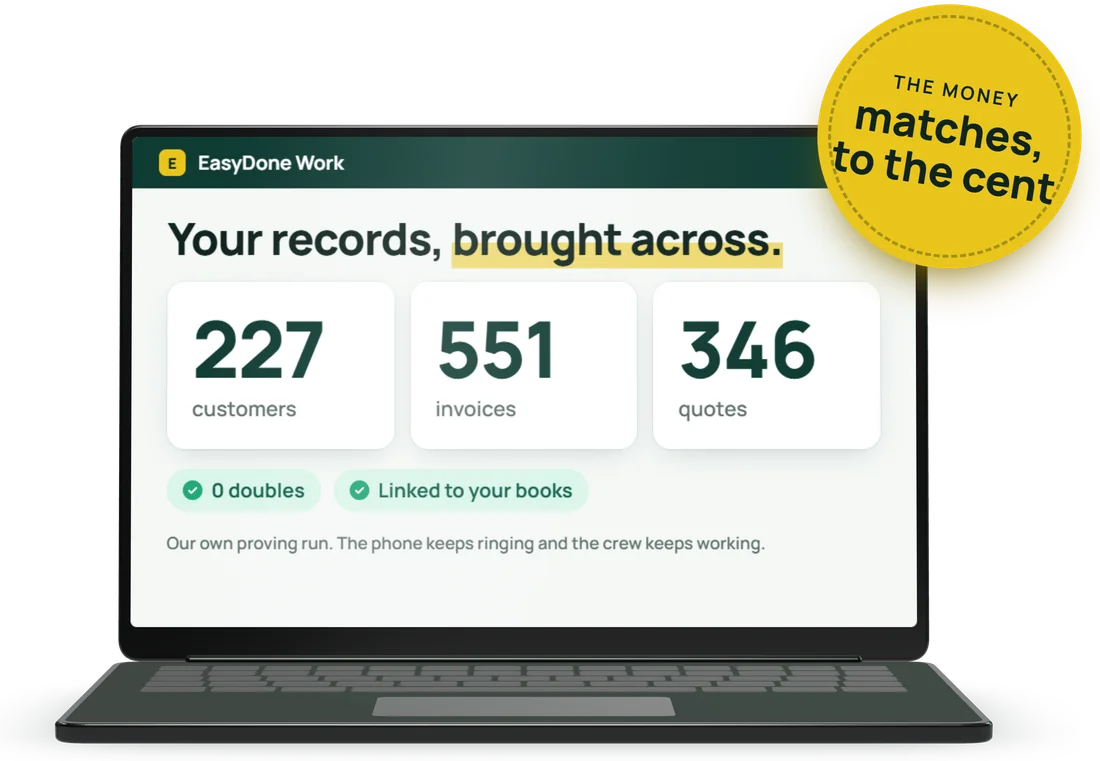
We plan the move out of your current system with you, and agree the approach and timeline before you start. We bring everything across: customers, jobs, quotes, invoices and every line, linked to your books.
Simpro gives you a backup of your data for 30 days after you leave, so the safest order is simple: we plan the move, you check what came across, and only then do you give notice.
EasyDone Work is $195 a month inc GST for 1 to 3 users, then $65 inc GST for each extra user. Everyone is a user, and their permissions decide what they can do. See pricing
Delight by Simpro is an AI that, in Simpro's words, follows up past customers for a trade business: it writes to them about their own jobs and equipment, flags maintenance and compliance work that's due, chases quotes that went quiet and shows who came back. Simpro showed it on a webinar on 19 November 2026.
Simpro didn't give a price on the 19 November 2026 webinar. It offered 30% off Delight until 26 November and asked people to request a quote. EasyDone Work is $195 a month inc GST for 1 to 3 users, then $65 inc GST for each extra user.
Not as one screen that scans every past customer for you. EasyDone Work has service agreements with visits planned through the year, an "every past customer" list you can email or text, and a ready-made automation that follows up quotes that go quiet. If finding work that's due across years of records is the main thing you need, weigh Delight fairly.
Simpro described Delight as "natively connected to Simpro" and didn't say whether it works without it. Check with Simpro.
The Delight details are what Simpro said on its webinar of 19 November 2026: Simpro's claims, which we haven't tested, and they may change. The marked rows in the table come from Simpro's own website, read 15 November 2026. We describe our own product from this website. Nothing here is a hands-on test of Delight.
Book a 30-minute demo and bring a real Simpro quote or job. We'll show you the same work in EasyDone, follow-up included.
See it with your own work in it.
Try it free for 7 days. Card up front, cancel anytime.
Or ring us:
1800 98 DONE1800 983 663