
Written by Colin Tross, founder of EasyDone and an audio visual installation business owner. Last checked 10 October 2026.
Run a solar job as five handovers, not one long job: survey to design, design to booking, booking to roof, roof to paperwork, paperwork to customer. Each handover has one owner, one record and one thing that must be true before the next person picks it up. Get those five right and the job runs. Miss one and you pay for it in drive time, STCs or a cranky phone call.
That's the whole answer. The rest of this is how to do it, what each miss really costs, and how we run it in EasyDone.
What does a missed handover actually cost?
Let's cost one. Take a made-up Bunbury outfit, Leschenault Sun & Storage: owner Tegan Moir, two install crews, one designer, one person in the office three days a week. They do a lot of work out past Dardanup and down towards Capel.
Here's a normal stuff-up. The survey photos show the north roof but nobody notes the vent pipe sitting right in the middle of the second row. The designer lays out 16 panels in two neat rows. The crew gets on the roof, finds the vent, rings the office, the office rings the designer, the designer's at a site visit in Australind.
| What it costs | Hours |
|---|---|
| Two installers standing around while the layout gets sorted | 3 |
| Redesign, new layout sent to the customer, wait for their yes | 2 |
| Second trip back out to finish the extra panel row | 4 |
| Office time re-booking, re-texting and explaining it to the customer | 1 |
| Total for one missed line in a survey note | 10 |
Ten hours. A day and a bit of paid labour, and a customer who now thinks you don't know their roof. And that's the cheap version. The expensive version is a paperwork miss, and we'll get to that.
Handover 1: survey to design
The survey's job is to make the designer's job boring. Hand over:
- The roof, as it really is. Orientation, pitch, material, condition, and every obstacle: vents, skylights, aerials, a satellite dish nobody's used since 2009. Photo each one with a note on what it shows.
- The switchboard and meter. A clear photo of the board, the meter, and a note on spare capacity and anything that looks dodgy.
- The customer's real ask. "Wants a battery later" is a design input. Write it down even if it's not in this quote.
- Access. Ladder spot, dogs, gate code, side-passage width for the inverter.
Photo the work, not the family. The OAIC's guidance on photos of recognisable people is a good reminder to keep kids, mail on the bench and the lounge room out of frame.1
Handover 2: design to booking
The accepted design is the contract with your own crew. Keep one version marked "accepted", with the panel layout, the inverter, the equipment list and the price the customer said yes to. Anything after that is a proposed change until the customer agrees to it, not a quiet swap of the PDF.
Before you book, four things must be true:
- The customer accepted this version of the design and the price.
- The panels, inverter, rails and isolators are on the shelf or ordered with a date.
- The network side is sorted for your area and system size.
- The crew knows the roof: the survey photos and notes go with the job, not in someone's camera roll.
If one of those isn't true, it's not a booking. It's a hope with a date on it.
Handover 3: booking to roof
Your crew should open the job and see everything they need without ringing anyone: address, access notes, the accepted layout, the survey photos, the equipment list and the customer's number.
The work-at-height side runs through your own safety process. Safe Work Australia sets out when high-risk construction work needs a safe work method statement,2 and roof work is the obvious one. Keep that on its own track with whoever signs it off, not buried in the job notes.
When the roof doesn't match the plan, the rule is simple: record it, price it, get the yes, then build it. The vent pipe gets a photo and a note. The office sends the revised layout. The customer agrees. Then the extra panel goes on. Nobody "just sorts it" and explains later.
Handover 4: roof to paperwork
This is where the expensive mistakes live. Three tracks, three owners, and none of them is "the job status says complete".
| Paperwork | Who it goes to | When |
|---|---|---|
| Preliminary notice (notifiable work) | The network operator | Before the work starts3 |
| Notice of completion (notifiable work) | The network operator | Within three days of finishing the work3 |
| Electrical safety certificate | The person the work was done for | Within 28 days of finishing the work3 |
All three can go through Building and Energy's free eNotice service.3
Then there are the STCs. Under the Small-scale Renewable Energy Scheme, the installer and designer need the right accreditation and the paperwork has to line up with the system you actually installed.4 The installer also has to be on site at set points of the job and prove it the way the scheme says, with properly dated photos.
The Clean Energy Regulator isn't mucking around. In July 2026 it declared a solar installer ineligible for three years after investigating 24 installations; it found the onsite attendance rules weren't met on 7 occasions and electrical safety certificates weren't provided on 17.5 Systems he installed in that window aren't eligible for STCs.5 That's the expensive version of a missed handover: not a lost day, lost certificates.
The CER also publishes the checklist its inspectors use on solar PV systems.6 Read it once with your crew leads. It's the cheapest training you'll ever do.
Handover 5: paperwork to customer
The customer should walk away knowing three things: what's on their roof, which documents they've got, and what's still with someone else (and when they'll hear). "All done!" isn't a handover if the certificate is still sitting in someone's drafts.
Give them the system details, the inverter make and serial, the warranty paperwork, and a plain note on anything pending. Then invoice it, while they're still happy.
How Tegan runs it in EasyDone
Yeah, we make EasyDone, so we're biased. Here's why we reckon a solar outfit gets more out of it than out of a calendar and a shared drive.
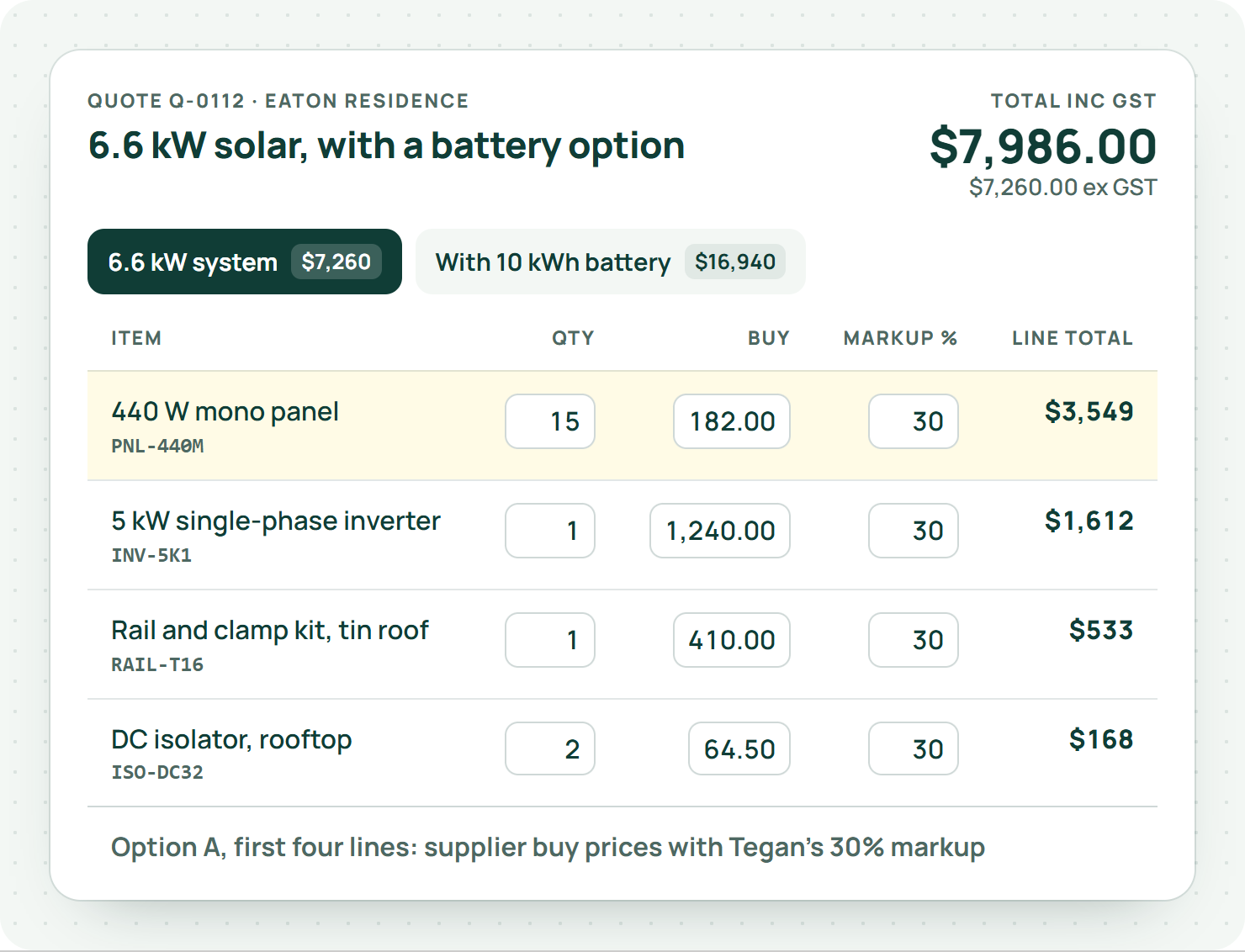
The quote becomes the job. Tegan builds the quote with options: the 6.6 kW system, and the same with a battery. Panels and inverters carry their supplier buy prices and her margin, so the lines price themselves. When the customer picks one, the won quote lands on the job with the equipment still to order.7
Stock gets reserved, not pinched. She raises the purchase order from the job. When the pallet lands, the panels and inverter go up in stock reserved for that job, so the Capel crew doesn't grab them for a rush job in town.7
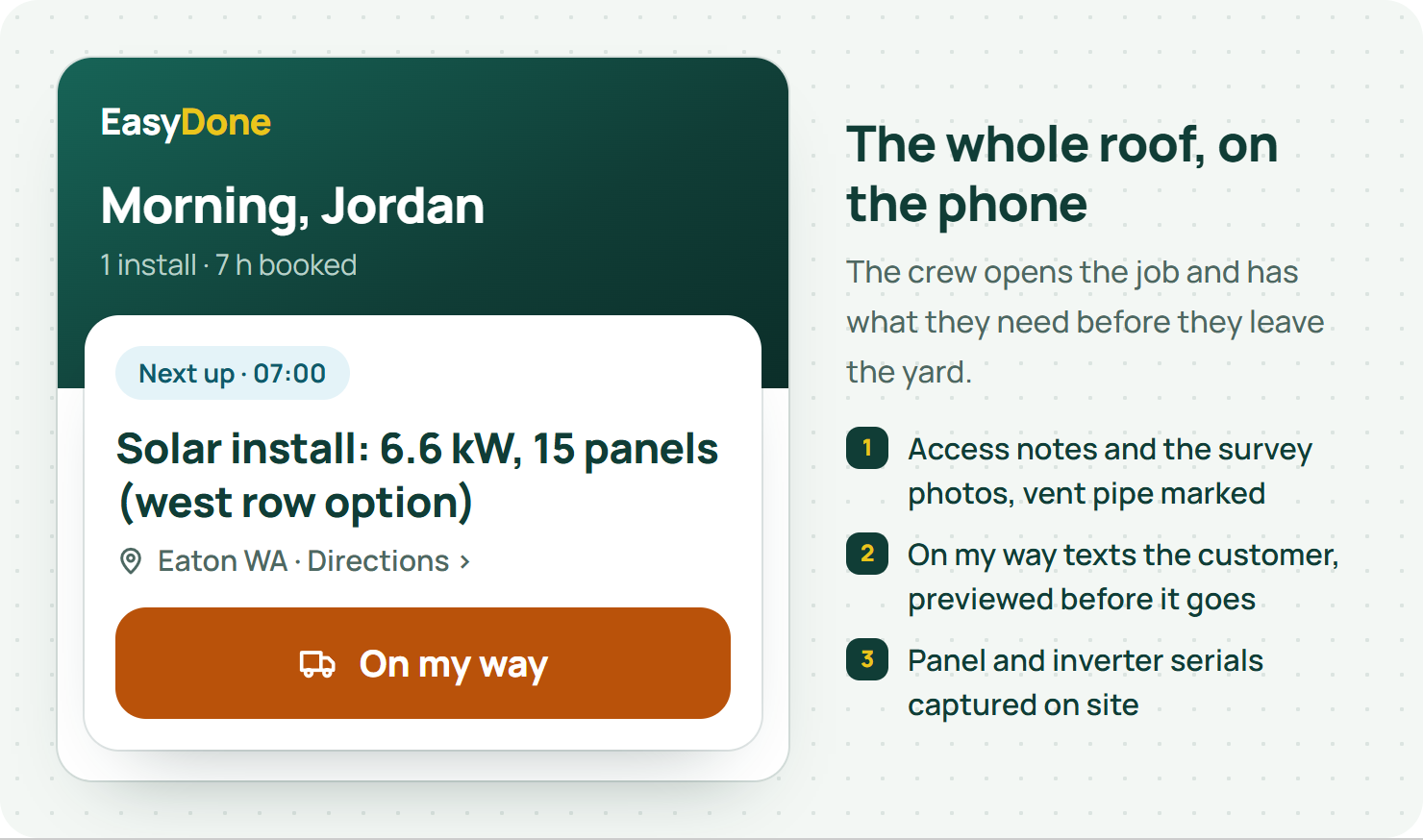
The crew gets the whole roof. On the phone, Today shows the job with the access notes and survey photos. On my way sends the customer a text the installer can read before it goes. Time runs against the job, and the serial numbers for the panels and inverter get captured on site, straight onto the record.7
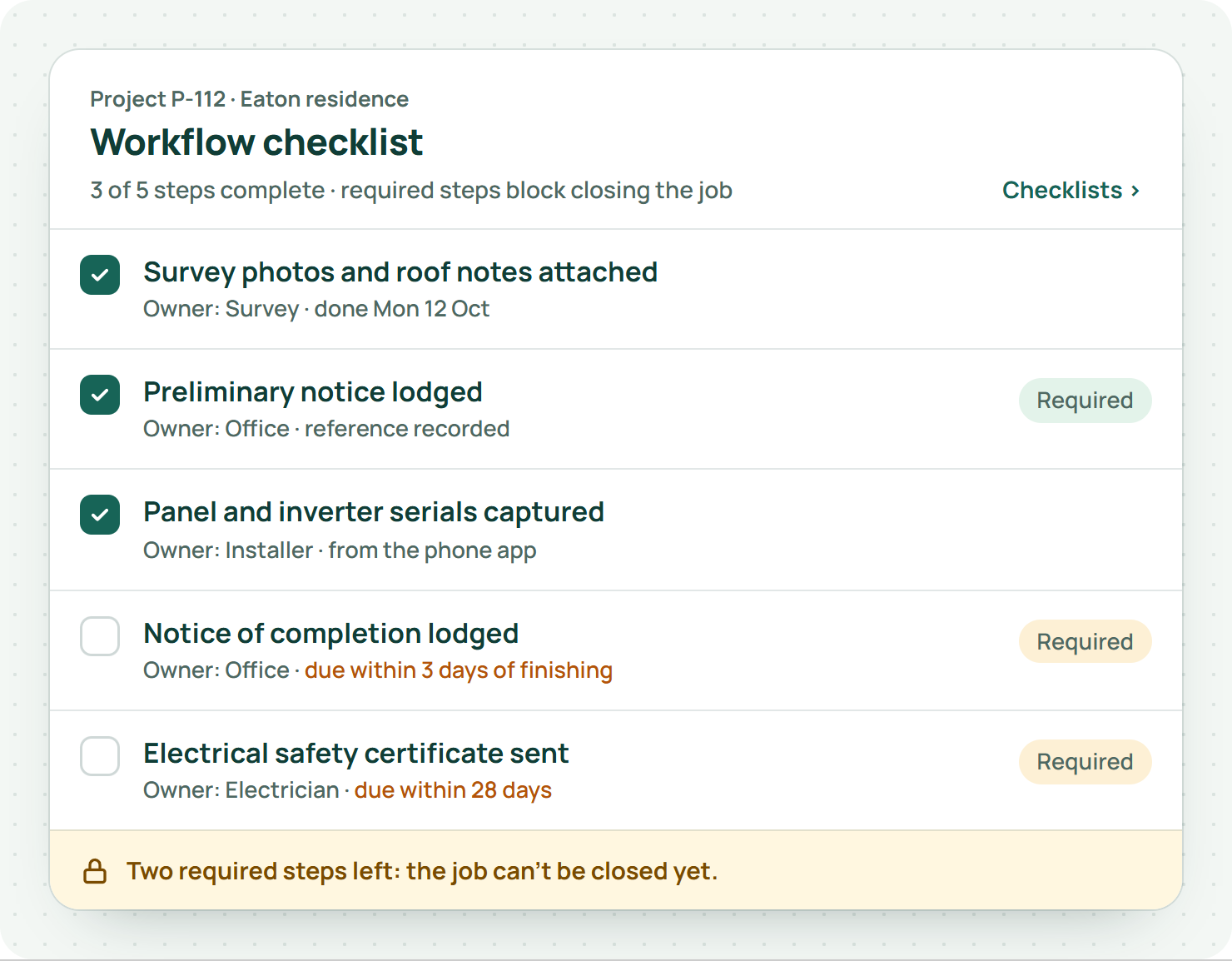
The paperwork can't be skipped. Tegan's solar job has required checklist steps: preliminary notice lodged, notice of completion lodged, certificate sent, each with its reference. The crew can't close the job until they're filled in.7 Our one honest limit: EasyDone tracks those steps, it doesn't lodge anything for you, and the "I'm here" tap on the phone is the office's record of arrival, not the CER's attendance evidence. That still goes through the scheme's own process.
The admin gets done by asking. At 4.30, from the ute on the Forrest Highway, Tegan asks the Assistant: "Send the Eaton customer the revised layout with the extra panel, same rates, and book the return for Thursday." It finds the job, uses her saved rates, shows her the revised quote, and waits for her OK before anything goes to the customer.8
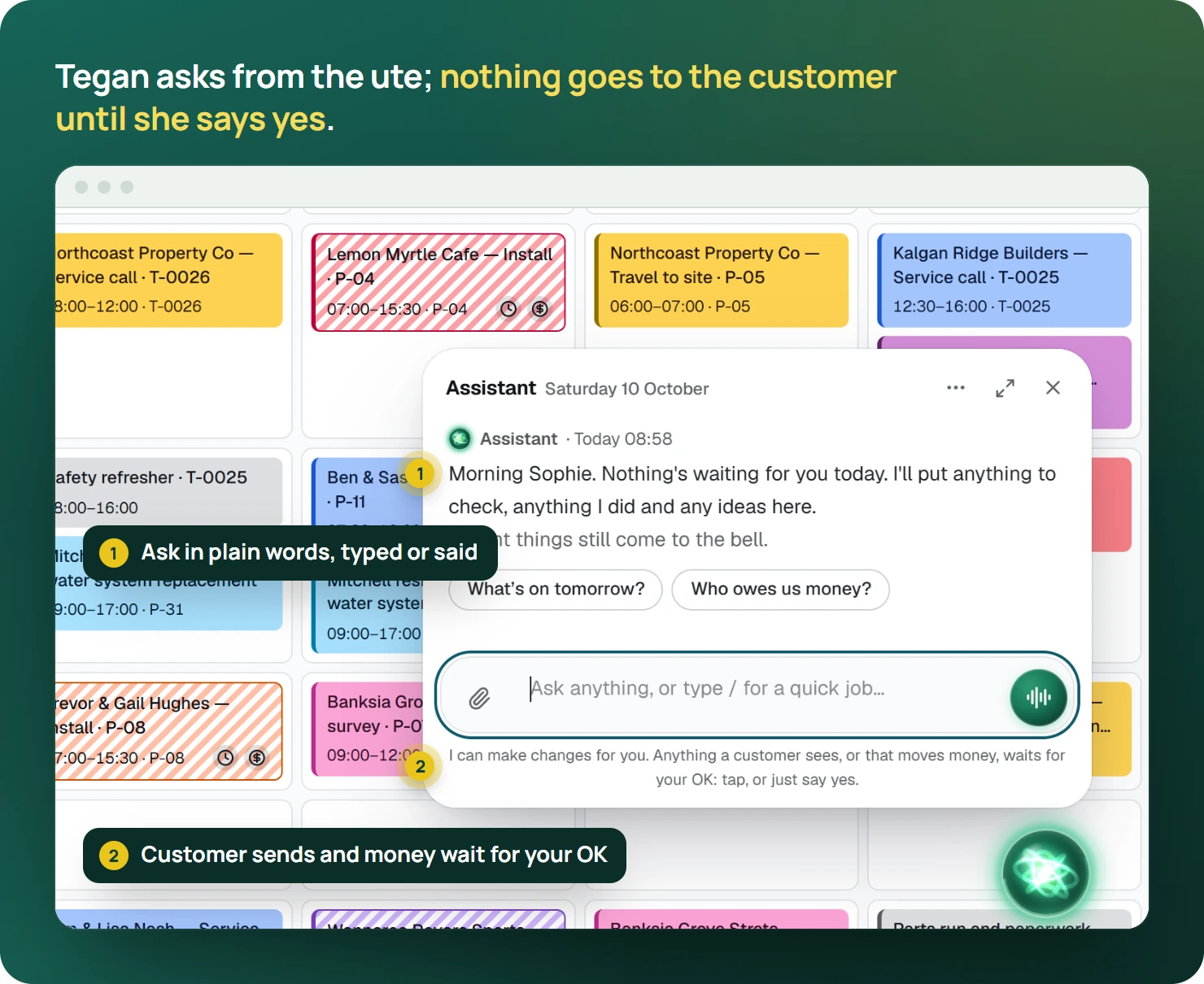
Then the invoice goes out straight from the finished job, and if it's overdue, the reminder goes without anyone having to remember.7
So what about that vent pipe?
Run the same Bunbury job again with the five handovers. The survey photo of the vent pipe has a note on it. The designer lays out 15 panels around it and offers a 16th on the west face as an option. The customer picks it on the quote. The crew sees the layout and the vent on their phone before they leave the yard.
Ten hours saved, one customer who thinks you know their roof better than they do, and every certificate where it should be.
Where do you start?
Pick last month's messiest solar job, the one with the rework trip, and walk it through the five handovers. Find the one that broke. Fix that first.
If you'd like to see the whole run on screen, book a demo of EasyDone's field tools and bring a real job. We'll take it from the survey photos to the paid invoice, battery option and all.